
Wired 2.0 batch 11 – let’s change the game!
Hello Wired creators, room builders, game players and… the entire Habbo community! That’s right: this update is for everyone!
Batch 11 is here, and it is BIG!
Why don’t you read on, and see what it’s all about?
BRAND NEW: Configuration Items
Configuration items are a new type of item in Habbo. They configure how a game behaves, or provides help to the builder, by enabling/disabling them.
The benefits of making them items, rather than a room setting, is:
- People who have room modification rights can modify them
- They can be manipulated with Wired
- It’s faster to disable and enable them
- It doesn’t make the room settings more complex, since these things are quite niche/focused on game creators
We’ve just added the following four configuration items to the Shop! 👇
- Roller speed controller: controls the speed of all rollers in the room! There are four different speed configurations. Get ready to spice up your rollers 🎚️ , because roller mazes aren’t hard enough yet, right 🤐
- Handitem blocker: enabling this item makes it so people can no longer pass handitems, and can no longer drop handitems. The only way to change handitems now is to get one from a fridge or be given one by Wired.
- Wired disabler: disables Wired execution in a room! It can be a pain to set up Wired while other Wired is actively changing the room at the same time, so this will make wiring a bit easier!
- Invisible furni controller: this sounds interesting, what could it be? Perhaps you should look at the next section of this article!
Building with invisible furni!
So far, building with invisible furni has been a bit of a pain, right? Making furni invisible just to open “:furni”, somehow find the item you need, and rotate it back… My finger hurts just thinking about it.
Well I have good news for you, because the pain is over! Enable the Invisible furni controller to make all furni that are supposed to be invisible, invisible! Wanna continue building with them? Just disable the controller!
Currently, the following items fall under the invisible furni category: Magic Stack Tile, Magic Walk Tile & Invisible Block.
Now that we have a proper way to work with invisible furni, you didn’t think we would leave it at that right? We just added an entire range of new invisible furni to the Shop for you: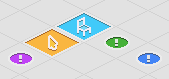
- Invisible Block (stackable & walkable version of the existing block)
- Invisible Block (unstackable & walkable version of the existing block)
- Invisible Block (unstackable & unwalkable version of the existing block)
- Invisible sit tile: This furni makes you sit! Just like a chair, but invisible 👻👻
- Invisible click tile: What now? A click tile? Sir, I can click my tiles just fine without a click tile… Read the next section for more info!
New Wired Boxes
Well, it wouldn’t be a Wired update without some actual Wired boxes, would it?
WIRED Trigger: User Clicks Tile
- Triggers when a user clicks on a tile (for walking).
- Just like you select furni in “WIRED Trigger: User Walks On Furni”, you also need to select some furni in this box. This time, you select Invisible click tiles.
WIRED Negative Effect: Send Signal & WIRED Negative Effect: Execute stacks
- Negative Wired boxes execute when the stack was triggered, but the conditions did not pass.
- By making a negative version for the 2 Wired boxes that enable execution of other stacks, we directly just made a system to do something we call “if-else” (in programming).
WIRED Effect: Adjust Counter Time
- Increases, decreases, or sets the value of a running counter.
- Want to make a game where a person gains extra time? Or can reset his time? It’s all possible now!
WIRED Condition: Can Perform Movements
- I kept my favourite box for last, because this is a special one! This Wired condition simulates the movements a Wired stack will do. It passes if “all movements can be performed”
- Use this to move larger constructs inside Habbo! If not all the furni can be moved, and the Wired stack has this condition, it will not move any of them
- Example usage can be found here.
Wired teams rework
We’re almost done with the updates! But a last and important one is a rework of Wired teams.
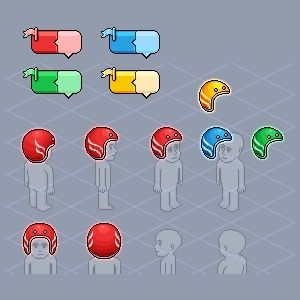
- Firstly, in “WIRED Effect: Join Team” you can now pick the type of team to join. The options are: Wired, Battle Banzai and Freeze.
- When part of a team, you will talk with a dedicated new chat bubble in your team’s colour.
There are also some updates that are specific to the “Wired” type of team:
- The team previously reused the Freeze helmet effect, it now has an effect of its own.
- The limit of 5 users per team is lifted. An unlimited amount of players can join a team!
- Bots can be part of teams too now, but can not be placed on a leaderboard.
That was all for this new Wired update! Will that be enough to keep you busy while waiting for batch 12, variables? I personally can’t wait to see everything that will be created with these new functionalities.