
Hey Habbos!
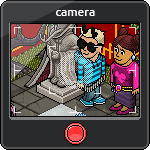 We’re extremely happy and excited to announce the launch of our brand new photo-sharing feature!
Now, you and your friends can publish your photos to your profiles on the Habbo website, adding a bit more of a (very important, we reckon) personal flavour to them.
Here’s a quick guide to using the new feature:
- Take a photo as you normally would, using the circular red button.
- Click the smaller green ‘Edit’ button.
- After you’ve made all the edits you want to make, click the green ‘Preview’ button in the bottom right hand corner.
- Lastly, click on the green ‘Publish’ button to publish your photo to your Habbo profile!
While we’re really excited about releasing this new and uber-awesome feature, we’re even MORE excited because today is also the launch of our Grand Prize Photo Competition! Check out the link for details on what you have to do to enter this competition – trust us when we say that the grand prize bundle is one you really want to win!
We’d love it if you could try and tell as many of your Habbo friends as possible about the new camera feature, because as you probably know all too well, sharing photos is SO much more fun when you share them with your friends. Also – stay tuned because in the future we’re keen on making the camera feature better. Yes, even better!
Habbo Staff
-p2, Waltz, and Kitchen-